

I found that pictures of my quilts offered great opportunities to play. Here's a picture of my "Peacock Blues" and the image, "Rose Window" that came from it.
To do this one I selected a portion of the center of the quilt and copied it to a new layer. Then I used Polar Coordinates, Glowing Edges and finally Plastic Wrap filters on it. The actual image is much brighter than it appears here, and reminds me of a stained glass window.
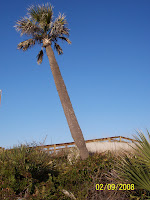
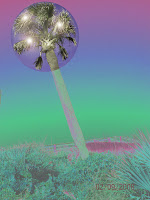
A second set I did is a little different. It is a photo of a palm tree I took on Tybee Island, Ga, and an alien version of it. For this one, I selected the area
around the top of the palm tree and then selected inverse. In the inverse area I did Solarize, then used Image Hue/Saturation to adjust the colors until I liked them. Then I inversed the selection again to get the top of the palm. I used Hue/Saturation to adjust the color there, used Lens Flare to add the lights, then used Spherize. Hope this inspires someone else!


 nse to have two sewing blogs, so, this is it.